
How to use Myopia Monitor
- Enter measurements. Add the visit date, axial length, spherical equivalent, or both for either eye. Visits are automatically arranged by date.
- Add an optional comparison. Enter the patient’s birthday and choose a reference population for AL and SER. East Asian uses the CLEERE Asian American cohort for SER; Non East-Asian uses the published US mix (Mixed).
- Review the results. The graphs show measurements over time, and labels between visits show the annualized rate of change.
- Prepare the patient report. Print the report or use the QR code to provide a digital version.
- Save measurements for next time. Copy the generated measurements code into the patient’s chart so it can be loaded and updated at the next visit.
Growth comparisons are educational reference points—not predictions or treatment recommendations. Interpret measurements alongside the complete clinical picture.
Step 1: Enter Measurements
i
Enter axial length, spherical equivalent refraction, or both for each visit. You can enter visits in any order—the graphs sort them automatically. Measurements for just one eye are okay. SER means spherical equivalent refraction: sphere plus half the cylinder, in diopters. Use a consistent measurement method across visits.
Load a previous measurements code
Myopia Control Report
Step 2: Add demographic information (optional)
i
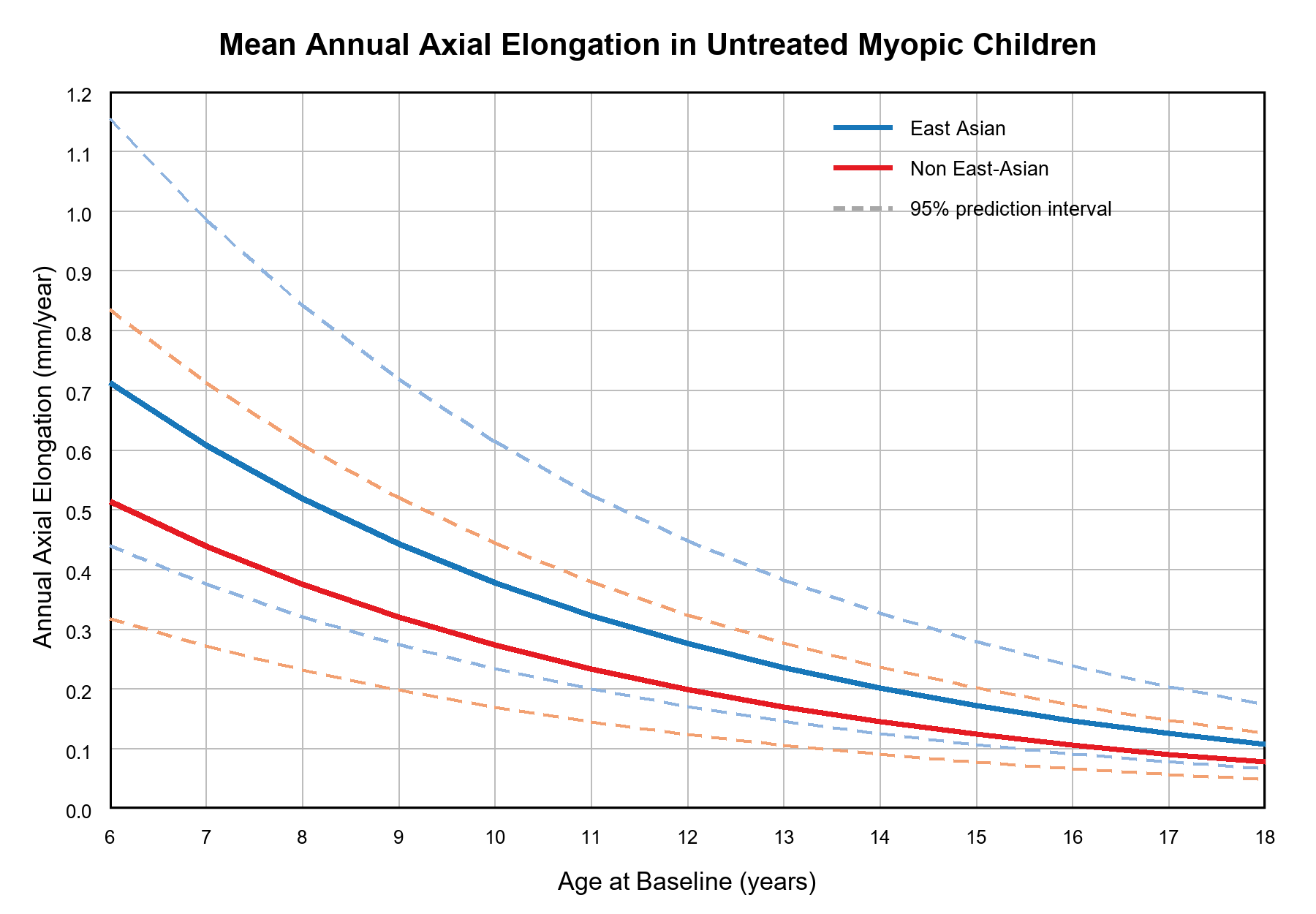
To help judge whether treatment is slowing myopia, compare the patient’s changes with typical changes in children who are not receiving myopia-control treatment. Add a birthday and reference population to show available comparisons. Study groups may not fully match every patient, so these averages are a guide—not proof that treatment is working.
Or choose in three clicks
Month
Day
Year
Reference population for AL and SER
East Asian uses the Asian American cohort; Non East-Asian uses Mixed (the published US mix, including Asian American participants). Sexes are averaged equally.
Step 4: Prepare patient education
i
You can provide customized printouts or show a QR code that the family can scan on their phones.
Choose what to include in the printed patient report.
Digital (QR code)
Have the family scan this code to open the digital patient report on their phone.
QR code will appear after data is entered.
Normative reference graphs
Step 5: Update records
i
Copy the updated measurements code into the patient’s chart. At the next visit, paste it into “Load a previous measurements code,” then add the new measurements.
Enter measurements to generate a code